Quick Start
This is a short example how to manage VCF files.
After you have read this page, you can
Import Viola package to your script.
Read VCF files to create viola.Vcf object.
Convert VCF files into BEDPE files, with any features you wish, such as INFO fields and FORMAT fields.
Filter SV records by any features, including genomic positions, INFO fields, FILTER fields, and FORMAT fields.
See Also:
In this tutorial, we will only deal with the viola.Vcf class, but many of the features available in this class are also available in the Bedpe, MultiBedpe and MultiVcf classes.
Individual tutorials for classes not covered here are currently under development.
Import Viola to your script
In [1]: import viola
Create Vcf object from VCF file.
In order to use Viola’s features, you must first run read_vcf to create an viola.Vcf object.
In [2]: url = 'https://raw.githubusercontent.com/dermasugita/Viola-SV/master/docs/_static/tutorial.manta.vcf'

In [3]: vcf = viola.read_vcf(url, variant_caller='manta', patient_name="manta1") # filepath, url, and file-like object are acceptable.
Now you’re ready to perform a number of functions that the Viola package has.
To learn detail data structure of viola.Vcf object, see Viola’s Data Structure.
Viewing the contents of viola.Vcf object
You may want to view the content of Vcf objects after creating them. To do so, you have three options.
1) Simply print the object.
# The column name 'be' stands for 'breakend'.
In [4]: print(vcf)
INFO=imprecise,svtype,svlen,end,cipos,ciend,cigar,mateid,event,homlen,homseq,svinslen,svinsseq,left_svinsseq,right_svinsseq,contig,bnd_depth,mate_bnd_depth,somatic,somaticscore,junction_somaticscore,inv3,inv5
Documentation of Vcf object ==> https://dermasugita.github.io/ViolaDocs/docs/html/reference/vcf.html
        id              be1              be2 strand  qual svtype
0    test1    chr1:82550461    chr1:82554226     +-  None    DEL
1    test2    chr1:22814217    chr1:92581132     --  None    INV
2    test3    chr1:60567906    chr1:60675941     +-  None    DEL
3    test4    chr1:69583190    chr1:69590948     +-  None    DEL
4    test5  chr11:104534877  chr11:104536574     +-  None    DEL
5  test6_1  chr11:111134697   chr17:26470495     +-  None    BND
6  test6_2   chr17:26470495  chr11:111134697     -+  None    BND
2) Generate BEDPE like pandas.DataFrame.
In [5]: vcf_bedpe_like = vcf.to_bedpe_like()

In [6]: print(vcf_bedpe_like)
  chrom1     start1       end1 chrom2     start2       end2     name score strand1 strand2
0   chr1   82550460   82550461   chr1   82554225   82554226    test1  None       +       -
1   chr1   22814216   22814217   chr1   92581131   92581132    test2  None       -       -
2   chr1   60567905   60567906   chr1   60675940   60675941    test3  None       +       -
3   chr1   69583189   69583190   chr1   69590947   69590948    test4  None       +       -
4  chr11  104534876  104534877  chr11  104536573  104536574    test5  None       +       -
5  chr11  111134696  111134697  chr17   26470494   26470495  test6_1  None       +       -
6  chr17   26470494   26470495  chr11  111134696  111134697  test6_2  None       -       +
The way to add INFO, FILTER, and FORMAT to this bedpe-like DataFrame is explained here.
3) Use the get_table() method to get individual tables composing the Vcf object.
# the returned value is pd.DataFrame
In [7]: vcf.get_table('positions')
Out[7]:
        id chrom1       pos1 chrom2       pos2  ... strand2 ref                 alt  qual svtype
0    test1   chr1   82550461   chr1   82554226  ...       -   G               <DEL>  None    DEL
1    test2   chr1   22814217   chr1   92581132  ...       -   T               <INV>  None    INV
2    test3   chr1   60567906   chr1   60675941  ...       -   T               <DEL>  None    DEL
3    test4   chr1   69583190   chr1   69590948  ...       -   T               <DEL>  None    DEL
4    test5  chr11  104534877  chr11  104536574  ...       -   C               <DEL>  None    DEL
5  test6_1  chr11  111134697  chr17   26470495  ...       -   T   T[chr17:26470495[  None    BND
6  test6_2  chr17   26470495  chr11  111134697  ...       +   T  ]chr11:111134697]T  None    BND

[7 rows x 11 columns]
The names of all the tables in vcf are stored in the table_list attribute:
In [8]: vcf.table_list
Out[8]:
['positions',
 'filters',
 'imprecise',
 'svtype',
 'svlen',
 'end',
 'cipos',
 'ciend',
 'cigar',
 'mateid',
 'event',
 'homlen',
 'homseq',
 'svinslen',
 'svinsseq',
 'left_svinsseq',
 'right_svinsseq',
 'contig',
 'bnd_depth',
 'mate_bnd_depth',
 'somatic',
 'somaticscore',
 'junction_somaticscore',
 'inv3',
 'inv5',
 'formats',
 'contigs_meta',
 'alts_meta',
 'infos_meta',
 'formats_meta',
 'filters_meta',
 'samples_meta']
You can get any table you want.
In [9]: vcf.get_table('formats_meta') # get header information of FORMAT field
Out[9]:
   id number     type                    description
0  PR   None  Integer  Spanning paired-read suppo...
1  SR   None  Integer  Split reads for the ref an...
Export as VCF/BEDPE file
You can export VCF/BEDPE files by to_vcf/to_bedpe method.
vcf.to_vcf('/path/to/the/output.vcf')
vcf.to_bedpe('/path/to/the/output.bedpe')
Filter Vcf object
Filtering VCF file is an essential step of bioinformatics study. viola.Vcf object provides an intuitive way to filter SV in almost any item.
You have two options for filtering.
1) Filter with queries using filter method
Viola has a query system that is easy to understand.
First, let’s look at a couple of examples.
a. Filter with SVTYPE of the INFO field.
syntax: "<INFO name> [<value index>] <operator> <value>"
Please do not omit spaces.
<value indexer> is optional.
The <value indexer> is a 0-origin indexer which allows you to specify which of the comma-separated INFOs, such as CIPOS, should be filtered.
The following syntax can also be used for other INFO.
# filter with svtype.
In [10]: vcf.filter('svtype == DEL')
Out[10]:
INFO=imprecise,svtype,svlen,end,cipos,ciend,cigar,mateid,event,homlen,homseq,svinslen,svinsseq,left_svinsseq,right_svinsseq,contig,bnd_depth,mate_bnd_depth,somatic,somaticscore,junction_somaticscore,inv3,inv5
Documentation of Vcf object ==> https://dermasugita.github.io/ViolaDocs/docs/html/reference/vcf.html
      id              be1              be2 strand  qual svtype
0  test1    chr1:82550461    chr1:82554226     +-  None    DEL
1  test3    chr1:60567906    chr1:60675941     +-  None    DEL
2  test4    chr1:69583190    chr1:69590948     +-  None    DEL
3  test5  chr11:104534877  chr11:104536574     +-  None    DEL
# example of filtering using <value index>
# The code below means that if the right value of CIPOS (e.g. the value "20" of CIPOS=-10,20) is
# lower than 60, the SV record will be output.
In [11]: using_value_idx = vcf.filter('cipos 1 < 60').to_vcf_like()

In [12]: print(using_value_idx)
  chrom1      pos1     id ref    alt  ...           filter                           info format  sample1_N  sample1_T
0   chr1  82550461  test1   G  <DEL>  ...  MinSomaticScore  IMPRECISE;SVTYPE=DEL;SVLEN...  PR:SR  21,0:10,0  43,4:15,3
1   chr1  22814216  test2   T  <INV>  ...  MinSomaticScore  IMPRECISE;SVTYPE=INV;SVLEN...     PR       24,0       35,5
2   chr1  60567906  test3   T  <DEL>  ...  MinSomaticScore  SVTYPE=DEL;SVLEN=-108034;E...     PR       23,0       44,6

[3 rows x 11 columns]

In [13]: print(using_value_idx['info'].values)
['IMPRECISE;SVTYPE=DEL;SVLEN=-3764;END=82554225;CIPOS=-51,52;CIEND=-51,52;SOMATIC;SOMATICSCORE=10'
 'IMPRECISE;SVTYPE=INV;SVLEN=69766915;END=92581131;CIPOS=-51,51;CIEND=-89,90;SOMATIC;SOMATICSCORE=11;INV5'
 'SVTYPE=DEL;SVLEN=-108034;END=60675940;CIPOS=-44,44;CIEND=-38,39;SOMATIC;SOMATICSCORE=18']
Note
What is <value index>?
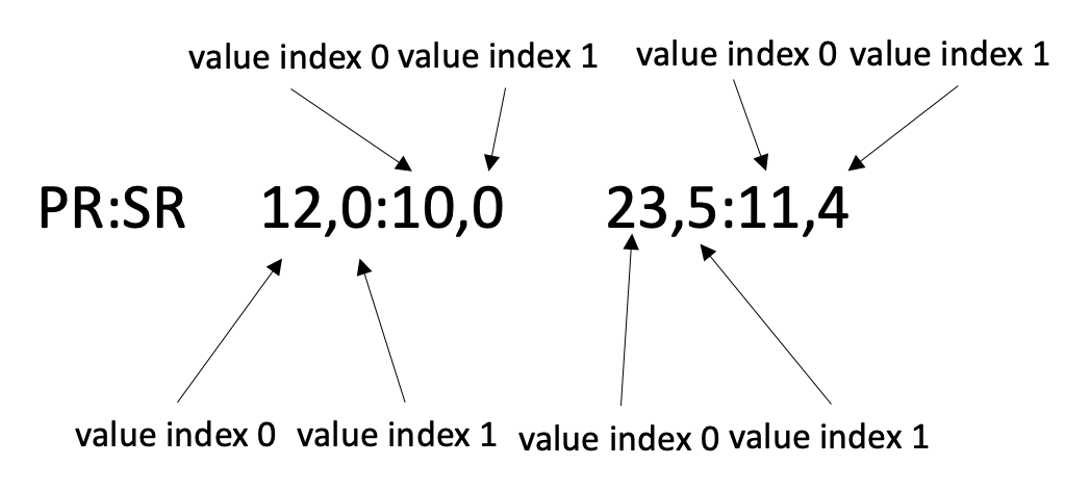
Some INFO and FORMAT entries are separated by commas to store more than one value.
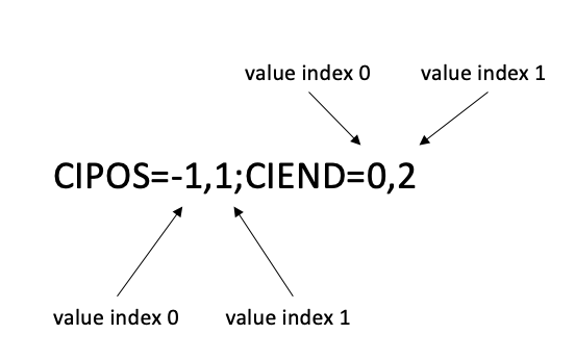
For example, the CIPOS and CIEND entries of INFO field always store two values:
CIPOS=-1,1;CIEND=0,2
<value index> is assigned to such data with 0-origin manner as shown below:
As another example, the values in the FORMAT field of Manta VCF are separated by commas.
b. Filter with genomic coordinates.
syntax: "<'be1'|'be2'> <chromosome>[:[<start position>]-[<end position>]]"
‘be’ stands for ‘breakend’.
If you skip <start position> with the minus sign kept, you can get all SV record younger than <end position>, and vice versa if you skip <end position>.
Note that <start position>-<end position> specifies genomic coordinates with left-closed, right-open interval, that is, [<start position>, <end position>).
# filter with genomic coordinates.
In [14]: vcf.filter('be1 chr11')
Out[14]:
INFO=imprecise,svtype,svlen,end,cipos,ciend,cigar,mateid,event,homlen,homseq,svinslen,svinsseq,left_svinsseq,right_svinsseq,contig,bnd_depth,mate_bnd_depth,somatic,somaticscore,junction_somaticscore,inv3,inv5
Documentation of Vcf object ==> https://dermasugita.github.io/ViolaDocs/docs/html/reference/vcf.html
        id              be1              be2 strand  qual svtype
0    test5  chr11:104534877  chr11:104536574     +-  None    DEL
1  test6_1  chr11:111134697   chr17:26470495     +-  None    BND

In [15]: vcf.filter('be1 !chr1')
Out[15]:
INFO=imprecise,svtype,svlen,end,cipos,ciend,cigar,mateid,event,homlen,homseq,svinslen,svinsseq,left_svinsseq,right_svinsseq,contig,bnd_depth,mate_bnd_depth,somatic,somaticscore,junction_somaticscore,inv3,inv5
Documentation of Vcf object ==> https://dermasugita.github.io/ViolaDocs/docs/html/reference/vcf.html
        id              be1              be2 strand  qual svtype
0    test5  chr11:104534877  chr11:104536574     +-  None    DEL
1  test6_1  chr11:111134697   chr17:26470495     +-  None    BND
2  test6_2   chr17:26470495  chr11:111134697     -+  None    BND

In [16]: vcf.filter('be2 chr1:69583189-')
Out[16]:
INFO=imprecise,svtype,svlen,end,cipos,ciend,cigar,mateid,event,homlen,homseq,svinslen,svinsseq,left_svinsseq,right_svinsseq,contig,bnd_depth,mate_bnd_depth,somatic,somaticscore,junction_somaticscore,inv3,inv5
Documentation of Vcf object ==> https://dermasugita.github.io/ViolaDocs/docs/html/reference/vcf.html
      id            be1            be2 strand  qual svtype
0  test1  chr1:82550461  chr1:82554226     +-  None    DEL
1  test2  chr1:22814217  chr1:92581132     --  None    INV
2  test4  chr1:69583190  chr1:69590948     +-  None    DEL
c. Filter with FORMAT table
syntax: "<sample name> <FORMAT name> [<FORMAT index>] <operator> <value>
FORMAT indexer is optional. It is not required when the FORMAT isn’t separated by commas.
FORMAT indexer is 0-origin. Default value is 0.
# The meaning of this code is that if the right value of the PR of sample1_T
# in the FORMAT field (e.g. the value "3" in PR:SR 6,7:8,9  1,3:5,2) is greater than 5,
# the SV records will be returned.
In [17]: vcf.filter('sample1_T PR 1 > 5').to_bedpe_like(add_formats=True)
Out[17]:
  chrom1     start1       end1 chrom2     start2  ...  strand2 sample1_N_PR_0 sample1_N_PR_1 sample1_T_PR_0 sample1_T_PR_1
0   chr1   60567905   60567906   chr1   60675940  ...        -             23              0             44              6
1   chr1   69583189   69583190   chr1   69590947  ...        -             21              0             20             12
2  chr11  104534876  104534877  chr11  104536573  ...        -             22              0             57             14

[3 rows x 14 columns]
c. Filter with FILTER table
syntax: "[!]<FILTER name>"
When “!” mark is prepended, the SV records excluding <FILTER name> are returned.
In [18]: vcf.filter('PASS').to_bedpe_like(add_filters=True)
Out[18]:
  chrom1     start1       end1 chrom2     start2  ...   name score strand1 strand2  PASS
0   chr1   69583189   69583190   chr1   69590947  ...  test4  None       +       -  True
1  chr11  104534876  104534877  chr11  104536573  ...  test5  None       +       -  True

[2 rows x 11 columns]

In [19]: vcf.filter('!PASS').to_bedpe_like(add_filters=True)
Out[19]:
  chrom1     start1       end1 chrom2     start2  ...     name score strand1 strand2 MinSomaticScore
0   chr1   82550460   82550461   chr1   82554225  ...    test1  None       +       -            True
1   chr1   22814216   22814217   chr1   92581131  ...    test2  None       -       -            True
2   chr1   60567905   60567906   chr1   60675940  ...    test3  None       +       -            True
3  chr11  111134696  111134697  chr17   26470494  ...  test6_1  None       +       -            True
4  chr17   26470494   26470495  chr11  111134696  ...  test6_2  None       -       +            True

[5 rows x 11 columns]
d. Query can be a list
In [20]: query2_1 = 'svlen < -4000'

In [21]: query2_2 = 'svlen > -10000'

In [22]: vcf2 = vcf.filter([query2_1, query2_2], query_logic='and')

In [23]: result2 = vcf2.to_bedpe_like(custom_infonames=['svtype', 'svlen'])

In [24]: print(result2)
  chrom1    start1      end1 chrom2    start2  ...  score strand1 strand2 svtype_0 svlen_0
0   chr1  69583189  69583190   chr1  69590947  ...   None       +       -      DEL   -7757

[1 rows x 12 columns]
You can perform set operations by passing expressions to query_logic.
In [25]: query3_1 = 'svtype == DEL'

In [26]: query3_2 = 'svtype == BND'

In [27]: query3_3 = 'somaticscore > 20'

# (query3_1 or query3_2) and (query3_3)
In [28]: vcf3 = vcf.filter([query3_1, query3_2, query3_3], query_logic='(0 | 1) & 2')

In [29]: print(vcf3.to_bedpe_like(custom_infonames=['svtype', 'somaticscore']))
  chrom1     start1       end1 chrom2     start2  ...  score strand1 strand2 svtype_0 somaticscore_0
0   chr1   69583189   69583190   chr1   69590947  ...   None       +       -      DEL             47
1  chr11  104534876  104534877  chr11  104536573  ...   None       +       -      DEL             38
2  chr11  111134696  111134697  chr17   26470494  ...   None       +       -      BND             24
3  chr17   26470494   26470495  chr11  111134696  ...   None       -       +      BND             24

[4 rows x 12 columns]
2) Filter with SV ID using filter_by_id method
Vcf.filter is very useful, but in some situation, you may have to filter with much more complex criteria.
In such cases we recommend to use Vcf.filter_by_id method.
Suppose you obtained the list of SV id, such as ['test2', 'test4'], as a result of quite complex criterion.
In this case, your code should be:
In [30]: vcf.filter_by_id(['test2', 'test4'])
Out[30]:
INFO=imprecise,svtype,svlen,end,cipos,ciend,cigar,mateid,event,homlen,homseq,svinslen,svinsseq,left_svinsseq,right_svinsseq,contig,bnd_depth,mate_bnd_depth,somatic,somaticscore,junction_somaticscore,inv3,inv5
Documentation of Vcf object ==> https://dermasugita.github.io/ViolaDocs/docs/html/reference/vcf.html
      id            be1            be2 strand  qual svtype
0  test2  chr1:22814217  chr1:92581132     --  None    INV
1  test4  chr1:69583190  chr1:69590948     +-  None    DEL